Last updated: 10 October 2026
SPIDERWATCH is a Windows desktop application for viewing system performance and device status. This policy explains the information it processes, local storage, and your controls.

Publisher: Jiri X. Dolezal / JXD VibeLabs
Spider: Photo © Jaroslav M. Soukup
Privacy contact: jxd@jxd.cz
- Information processed on your device
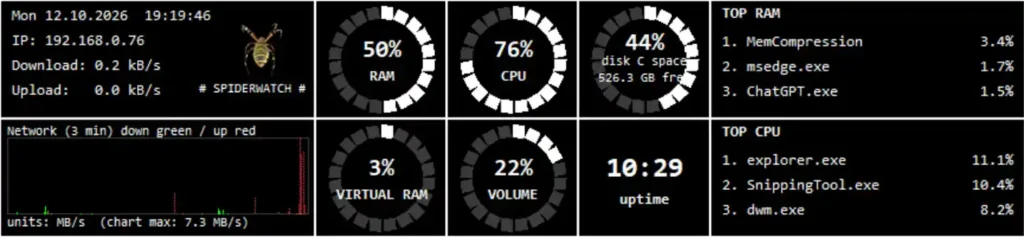
SPIDERWATCH uses information supplied by Windows to display CPU usage, physical memory and swap/pagefile usage, disk space, network transfer counters and speeds, your local IPv4 address, leading processes and their resource usage, uptime, date and time, and system output volume. It may also access process identifiers and information about the default audio output device.
This information supports the monitoring dashboard. SPIDERWATCH does not read document contents, inspect network traffic contents, record keystrokes, or capture microphone audio, camera video or screenshots. Accessing the output volume setting does not record sound. Process names, device names and diagnostic paths can reveal details about your software or Windows account. - Local storage
Preferences, diagnostic logs and performance history are stored locally, normally in:
%LOCALAPPDATA%\SPIDERWATCH
For packaged installations, Windows may redirect or manage this location.
Preferences include window position and display and logging settings. Performance history contains timestamps and monitored values such as CPU and memory usage, disk usage, network transfer rates, output volume and uptime. The standard performance CSV does not contain your IP address or process names. Diagnostic records may contain events, errors, paths, process identifiers and audio device details.
Performance history recording is enabled by default. While SPIDERWATCH runs, it records a sample approximately every ten seconds. - History retention and Reset history
The active performance history retains records for the current local calendar day and the preceding six local calendar days. Cleanup takes place when the application starts and after the local date changes. This is a calendar-day window, not a rolling period of exactly 168 hours. If the application is not running, its cleanup does not run; older records may remain until the next startup.
Reset history immediately reduces the active history file to its header and last recorded sample. Recording then continues. This action does not erase diagnostic logs, preferences, exported files, backups or other saved copies.
The seven-day rule applies to active performance history only. It does not establish a seven-day deletion schedule for diagnostic logs, preferences or copies you retain elsewhere. - Your controls
Monitoring continues while SPIDERWATCH is minimized to the notification area. Choose Exit to stop the application and its monitoring.
To disable performance history recording, close SPIDERWATCH and set log_metrics_to_csv to false in config.json. This setting does not disable diagnostic logging.
You can inspect and copy local files with Windows tools. To remove the application’s locally stored data, close SPIDERWATCH and delete its application data folder. Remove any separate copies or backups yourself. Deleting preferences resets your settings; starting SPIDERWATCH again may recreate files. Do not rely on uninstalling alone to remove every retained file or backup.
The publisher has no remote access to data that remains solely on your device and cannot delete it remotely. - Transmission and third parties
SPIDERWATCH does not automatically send monitoring data, preferences, performance history or diagnostic logs to the publisher. It does not require a separate SPIDERWATCH account and has no advertising, third-party analytics or automatic crash-report submission. We do not sell or rent the information processed by SPIDERWATCH or use it for advertising or profiling.
Windows networking functions are used to determine the local IP address; this is not a monitoring-data upload service. If you open a website or email link, your browser or email application handles the request. Those services operate under their own privacy policies. This policy describes the desktop application, not data processing by websites you visit. - Support correspondence
If you email jxd@jxd.cz, the publisher receives your address, message and any files you choose to send. These are used to answer you, investigate problems and maintain the software. Where applicable, this processing is based on the publisher’s legitimate interest in providing support and maintaining reliable software.
Support email is handled through the publisher’s email service provider. Correspondence is kept for as long as reasonably needed to resolve the request and related issues or satisfy legal obligations. Information may be disclosed where required by law. Review screenshots and logs before sending them and remove information you do not want to share. - Security
Local files depend on Windows account permissions and the security of your device. SPIDERWATCH does not separately encrypt its preferences or logs. Anyone with sufficient access to your account, device or backups may be able to read them. No security measure guarantees complete protection. - Microsoft Store and Windows
Microsoft may process information relating to Windows, Microsoft Store, installation, updates and platform diagnostics independently of the publisher. See the Microsoft Privacy Statement:
https://privacy.microsoft.com/privacystatement - Privacy rights and contact
Depending on applicable law, you may have rights to access, correct or erase personal information held by the publisher, restrict or object to processing, or receive a portable copy where applicable. You may also complain to your local data protection authority.
For requests concerning support correspondence or other personal information held by the publisher, contact jxd@jxd.cz. Use the local controls described above for information stored only on your device. - Policy updates
We may revise this policy when the application or our information practices change. The current version and its update date will be published at:
https://jxd.cz/code-is-poetry/spiderwatch/privacy-policy-for-jxd-vibelabs-spiderwatch/
Where required, we will provide additional notice or obtain consent before introducing new processing.