SPIDERWATCH is a Windows desktop monitor with a compact, black-and-white display and a spider mascot. It brings system activity, network transfer rates and everyday computer information into one movable window.

What you can see
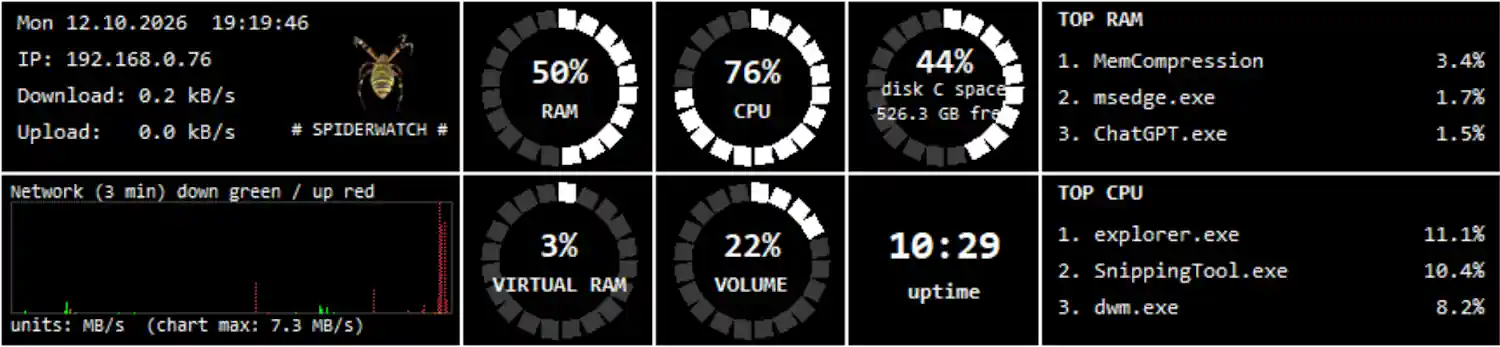
CPU, physical memory and virtual memory usage.
The three leading processes by CPU usage and by memory usage.
Download and upload rates, with a rolling graph covering approximately three minutes.
Local IPv4 address, date, time and computer uptime.
Used space and free space on drive C:.
The current system volume level.
The virtual memory reading refers to swap/pagefile usage, not graphics-card memory. Network rates describe traffic reported by the computer, not the maximum speed of your internet connection.
Getting started
- Install SPIDERWATCH from Microsoft Store and launch it.
- Drag the window to a convenient position.
- Right-click the display to open its menu.
- Choose Lock window position, Always on top or Start with Windows as needed.
Minimize to tray hides the window while monitoring continues. To restore it, use Show from the SPIDERWATCH notification-area icon. Choose Exit to stop monitoring.
Only one SPIDERWATCH instance can run on the computer at a time. Launching it again does not open another window or restore a hidden window; use the tray icon instead.

Your local data
SPIDERWATCH saves preferences, diagnostic information and performance history in:
%LOCALAPPDATA%\SPIDERWATCH
Performance history is enabled by default and records a sample approximately every ten seconds while the app runs. The active history keeps today and the preceding six local calendar days, with cleanup when the app starts and after the date changes.
Reset history immediately reduces the active history to its header and last recorded sample. Recording then continues. It does not clear diagnostic logs or saved copies.
SPIDERWATCH does not automatically upload performance history or diagnostic logs. No separate SPIDERWATCH account is required.