Last updated: 3 October 2026
TUXWATCH is a Windows desktop application that displays system performance and device status information.
This Privacy Policy explains what information TUXWATCH accesses, how it is used and stored, and the choices available to you.
Publisher: Jiri X. Dolezal / JXD VibeLabs
Privacy contact: jxd@jxd.cz

1. Information processed on your device
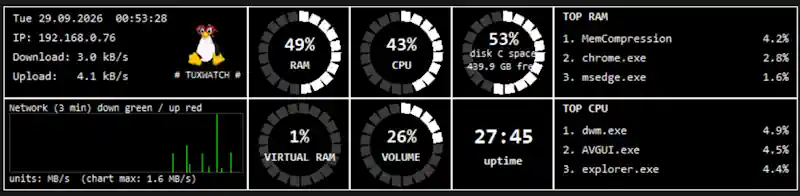
TUXWATCH accesses information provided by Windows to display its monitoring dashboard, including:
- CPU, RAM and virtual memory usage.
- Disk capacity, used space and available space.
- Network transfer counters and calculated upload and download speeds.
- Your local IP address.
- Running process names, process identifiers and resource usage.
- System uptime, date and time.
- System output volume and information about the default audio output device.
Process names and diagnostic file paths may reveal information about your installed software or Windows user account.
TUXWATCH uses this information to provide its monitoring features. It does not read the contents of your documents, inspect the contents of network traffic, record keystrokes, or capture microphone audio, camera video or screen images. Reading the system volume setting does not involve recording sound.
2. Information stored locally
TUXWATCH stores application settings and local logs in its application data folder, normally:
%LOCALAPPDATA%\TUXWATCH
Windows may manage or redirect this location for packaged installations.
Stored information may include:
- Settings: window position, display preferences and logging preferences.
- Performance history: timestamps, CPU and memory usage, output volume, disk usage, uptime and network transfer rates.
- Diagnostic logs: application events, errors and technical details, which may include local file paths, process identifiers or audio device names.
Performance history logging is enabled by default. The standard performance CSV does not include your IP address or running process names.
These files are used to preserve your preferences, provide performance history and help diagnose problems.
3. Transmission and sharing
TUXWATCH does not automatically upload its monitoring information, settings or local logs to the publisher.
The application does not include advertising, advertising identifiers, third-party analytics or an automatic crash-reporting service. We do not sell or rent information processed by TUXWATCH or use it for advertising or profiling.
TUXWATCH uses Windows networking functions to determine the local IP address. This is not a service for uploading monitoring data.
If you choose to open a website or email link, your browser or email application handles that action. The relevant website and service providers may process information under their own privacy policies.
4. Support communications
If you contact us, we receive the information you choose to provide, such as your email address, message and any attached screenshots or log files.
We use this information to respond to your request, investigate reported problems and maintain the application. Where applicable, this processing is based on our legitimate interest in providing support and maintaining reliable software.
Support correspondence is processed through our email service provider and may be disclosed where legally required. We retain it only for as long as reasonably necessary to handle the request and related issues, or to meet applicable legal obligations.
Please review logs and screenshots before sending them and remove information you do not wish to share.
5. Retention and your controls
Live monitoring takes place while TUXWATCH is running, including when it is minimized to the notification area. Exit the application to stop monitoring.
You can disable performance history logging by closing TUXWATCH and setting log_metrics_to_csv to false in its config.json file. This does not disable diagnostic logging.
Performance history uses size-based rotation rather than a fixed retention period. Settings, diagnostic logs and retained history files may remain until you delete them.
You can inspect and copy local files using standard Windows tools. To remove locally stored application data, exit TUXWATCH and delete its application data folder. Deleting settings resets your preferences, and running the application again may recreate files. Uninstalling the application may leave some local files behind.
The publisher cannot remotely access or delete information that remains solely on your device.
6. Security
Local files rely on Windows account permissions and your device’s security protections. TUXWATCH does not apply its own encryption to its settings or log files.
People or software with sufficient access to your Windows account, device or backups may be able to read these files. No storage or transmission method can guarantee absolute security.
7. Microsoft Store and Windows
Microsoft may independently process information associated with Windows, Microsoft Store, installation, updates and platform diagnostics. Microsoft’s processing is governed by the Microsoft Privacy Statement.
This policy describes TUXWATCH and the publisher’s handling of information.
8. Your privacy rights
Depending on applicable law, you may have rights to access, correct or delete personal information held by us, restrict or object to processing, or receive a portable copy where applicable. You may also have the right to complain to your local data protection authority.
To exercise these rights regarding support correspondence or other information held by the publisher, contact jxd@jxd.cz. For data stored only on your device, use the local controls described above.
9. Changes to this policy
We may update this policy when the application or our information practices change. The current version will be available at the privacy policy link in the Microsoft Store listing, with an updated date. Where required, we will provide additional notice or obtain consent before introducing new processing.